JavaScript SDK
Before you start: Review the Prerequisites page before integrating with the SDK. Skipping this step may result in integration issues.
Let's get started with Volume in less than 5 minutes!.
Our vanilla JavaScript component allows you to quickly and easily integrate Volume into your web application in no time!
Importing the script
Import our Volume script into your web page.
<script src="https://js.volumepay.io/Volume-0.9.3.min.js"></script>If you do not want to hardcode the version of the Volume component you can source the script from the domain. This will always fetch the newest version:
<script src="https://js.volumepay.io"></script>Component usage
After importing our Volume script you can initialise Volume object:
    const volume = new window.Volume({
    		environment: "SANDBOX",
    		applicationId: "5fd31d88-e59a-467e-b084-5c01430afced",
            country: "GB/DE/..",
    		disablePayButton: false, // not required; default FALSE
    		isWebView: false, // not required; default FALSE
    		eventConsumer: (event) => {
                console.log("A VOLUME EVENT: " + event)
            },
            errorConsumer: (error) => {
                console.error(JSON.stringify(error))
            },
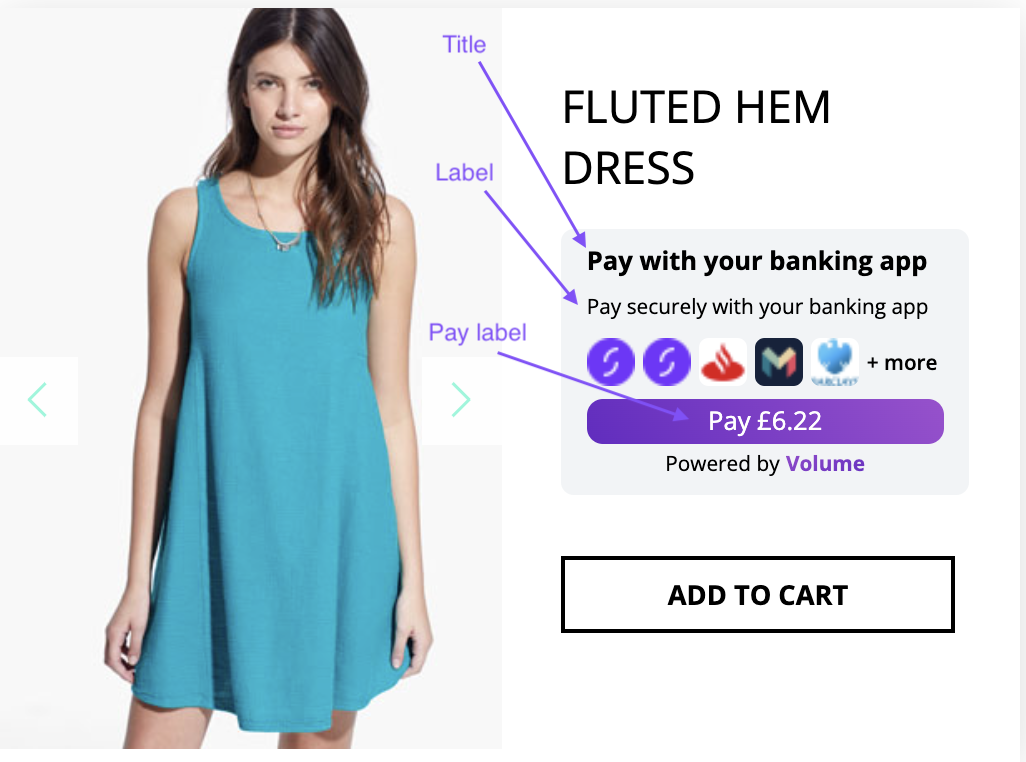
    		payLabel: "Pay $", // used for translations; default "Pay by Bank App"
    		agentType: "WEB_BROWSER" // not required
    	})
Volume component accepts an object with this set of options:
| key | type | example | description |
|---|---|---|---|
| environment | SANDBOX, LIVE | SANDBOX | One of our Volume environments, the component will connect to. |
| applicationId | string | 5fd31d88-e59a-467e-b084-5c01430afced | your application id which corresponds to selected Volume environment. |
| disableVolumeStyling | boolean (Optional) | false [Default: false] | If set to TRUE, then Component will NOT link automatically any Volume specific CSS files from Volume server and will NOT attach any Volume classes to your web application. The component will not be styled properly. |
| disableTailwindStyling [DEPRECATED] | boolean (Optional) | false [Default: false] | [DEPRECATED since component version 0.5] If set to TRUE, then Component will NOT link automatically any Tailwind classes to your web application. The component will not be styled properly. |
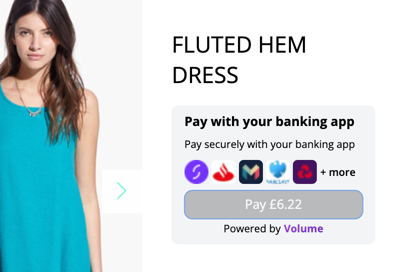
| disablePayButton | boolean (Optional) | false [Default: false] | If set to TRUE, then the Pay button visible on Volume component will be disabled when the component is initialised. It will have to be enabled using toggleButton(true) function. |
| eventConsumer | callback function (Optional) | (event) => {...} | This callback function will be called each time an internal Volume Event is triggered. For details look here. |
| errorConsumer | callback function (Optional) | (error) => {...} | This callback function will be called each time an error occurs. For details look here. |
| title [DEPRECATED] | string (Optional) | "Pay by bank" [DEFAULT: "Pay with your banking app"] | If you want to provide your own title to the component, then this string will be displayed. |
| label [DEPRECATED] | string (Optional) | "Pay securely" [DEFAULT: "Pay securely with your banking app"] | If you want to provide your own label below the title to the component, then this string will be displayed. |
| payLabel | string (Optional) | "Bezahlen mit der Bank-App £" [DEFAULT: "Pay by Bank App"] | If you want to provide your own translation to the pay button, then this string will be displayed. |
| agentType | "WEB_BROWSER", "MOBILE_APPLICATION" | "MOBILE_APPLICATION" [DEFAULT: "WEB_BROWSER"] | If you want a specific, other then the default WEB_BROWSER, callback url to be used, provide the correct one in this config. |
| isWebView | boolean (Optional) | false [Default: false] | If set to TRUE, then the authorisationUrl will contain a #OPEN_AS_APPLINK postfix, which enables the possibility of handling it differently in the application. |
A disabled Pay Button look:
Creating the payment
    let generatedMerchantPaymentId = generateMerchantPaymentId();

    volume.createPayment({
        amount: 6.22,
        currency: "EUR/GBP",
        merchantPaymentId: generatedMerchantPaymentId, // UUID
        paymentReference: "payment reference", //max 18 characters
        metadata: { // Optional, max 5000 chars after serialization
            "email": "email@mail.com"
        },
        agentType: "MOBILE_APPLICATION" // Optional
    })
Available countries
| Country | Country code | Currency |
|---|---|---|
| United Kingdom | GB | GBP |
| Germany | DE | EUR |
| France | FR | EUR |
| Netherlands | NL | EUR |
| Spain | ES | EUR |
| Belgium | BE | EUR |
When createPayment function is executed, Volume component prepares all the necessary data to communicate with the Volume backend.
amount field should not be wrapped in quotes. Volume supports up to two decimal places.
merchantPaymentId is a UUID which can be used in webhooks consumer to correlate payments. This field is required and must be unique per payment.
paymentReference is the string which will be visible to the client in banking application. This field can be up to 18 characters long.
metadata is an optional JSON object which will be passed back in webhooks as paymentMetadata. metadata must be a valid JSON object, so these values are not allowed:
    metadata: 1
    metadata: "test"
    metadata: [1,2,3]
metadata can be nested. This object is a valid example:
    metadata: {
        "email": "email@mail.com",
        "id": "0001",
        "type": "donut",
        "name": "Cake",
        "batters":
            {
                "batter":
                    [
                        { "id": "1001", "type": "Regular" }
                    ]
            },
    }
agentType is an optional (default WEB_BROWSER) parameter which can be set on the initial config level or override this value on each createPayment method call.
This parameter will determine which backend configured callback url. will be used.
If WEB_BROWSER is chosen (or left the default), then user will be redirected to the callback URL set in the dashboard under name "Callback url for web".
Otherwise, if MOBILE_APPLICATION is chosen, then user will be redirected to the callback URL set in the dashboard under name "Callback url for mobile".
Regenerating Merchant Payment ID
It is very important to remember that merchantPaymentId is unique per payment.
It is required to regenerate its value each time payment_initiated event is emitted.
Injecting the component
volume.injectComponent("volume-element-container")When injectComponent function is executed, Volume component HTML is injected into your web application exactly into the element with the id, which equals to the provided string.
Enabling and disabling the Pay Button
volume.toggleButton(buttonEnabledBoolean)The value passed as an argument to this function will enable or disable the button.
Regenerating Merchant Payment ID
Each time VolumeEvent.PAYMENT_INITIATED is emitted Merchant Payment ID should be set to a new unique value.
Error consumer
This callback function is triggered each time an error occurs. It can be a validation error, authentication error, network error etc. etc. The detail description of the issue will be passed in the argument of the callback method.
    const volume = new window.Volume({
    		...
    		errorConsumer: (error) => {
                console.error("Something is wrong ... : " + JSON.stringify(error))
            }
    		...
    	})
The argument is an object containing two attributes:
- location of type ErrorLocation
- error - a string description of the issue
Example:
    {
       "error": "Input validation error: field=[paymentRequest.reference], value=[TOO LOOOOOOOOOOOOONG], error=[must not be longer than 18 characters]",
       "location":"payWithBankInstitution"
    }
const ErrorLocation = {
payWithBankInstitution: "payWithBankInstitution",
fetchInstitutions: "fetchInstitutions"
}Programmatic payment initiation
A payment does not have to be initiated by the user clicking on an institution icon. If the institution is known upfront, it can also be triggered via a function call. Executing this function will open the bank authentication url, just as initiated by the user clicking on an icon.
    volume.createPayment({
        amount: 6.22,
        ...
    })
    volume.payWithInstitution("monzo")
Programmatic opening of the institution selection list
The institution selection list does not have to be initiated by the user clicking on the Pay Button. Executing the openInstitutionSelection function will show the list of institution icons just as it would be opened by the user.
    volume.createPayment({
        amount: 6.22,
        ...
    })
    volume.openInstitutionSelection()
Important note If the function is executed before institutions are fetched from the Volume server, the institution list will be opened after all the necessary data is fetched.
Merchant Provided Payer Details (CoP)
The merchantProvidedPayerDetails parameter allows merchants to pre-populate payer information to optimize the user experience during payment flow. This is also required to gain access to Volume's Confirmation of Payer feature, and to enable the search and filtering of payments by these details.
Usage
return volume.createPayment(
  {
    amount: amount,
    currency: currency,
    paymentReference: reference,
    merchantPaymentId: merchantPaymentId,
    metadata: {
      customerId: "customer01",
      email: "example@getvolume.com"
    },
  },
  {
    // Customer KYC details object
    email: "example@getvolume.com",
    name: "Trevor Scott",
    phone: "+447458674426",
    address: {
      addressLine1: "123 Main Street",
      addressLine2: "Apt 4B",
      countryCode: "GB",
      town: "London",
      postCode: "SW1A 1AA",
    },
  }
);
Compliance Details
Pay-ins can carry compliance details about the payer, the payment and the final recipient. The component has no UI for them: you pass the values you already hold, and the component sends them with the payment. dateOfBirth, nationality and residentialAddress go in the payer details object (the second argument of createPayment). reasonForPayment and ultimateBeneficiary go in the payment object.
volume.createPayment(
  {
    amount: 6.22,
    currency: "GBP",
    merchantPaymentId: generatedMerchantPaymentId,
    paymentReference: "payment reference",
    reasonForPayment: "Invoice 1042",
    ultimateBeneficiary: {
      fullName: "Jane Roe",
      currency: "GBP",
      country: "GB",
    },
  },
  {
    email: "john.doe@example.com",
    name: "John Doe",
    dateOfBirth: "1990-01-31",
    nationality: "GB",
    residentialAddress: "10 Downing Street, London, SW1A 2AA",
  }
);
Payer Details Properties
| Property | Type | Required | Description |
|---|---|---|---|
dateOfBirth | string | No | Customer's date of birth, yyyy-MM-dd (e.g. 1990-01-31). Must be in the past and not before 1900-01-01 |
nationality | string | No | Customer's nationality, ISO 3166-1 alpha-2 country code (e.g. GB) |
residentialAddress | string | No | Customer's residential address as free text, max 500 chars. An alternative to address |
Payment Properties
| Property | Type | Required | Description |
|---|---|---|---|
reasonForPayment | string | No | Why the payer is paying, max 100 chars |
ultimateBeneficiary | object | No | The party that finally receives the funds, when it is not you. See below |
ultimateBeneficiary Properties
| Property | Type | Required | Description |
|---|---|---|---|
fullName | string | No | Full name of the final recipient, max 255 chars |
currency | string | No | Currency the final recipient is paid in, three uppercase letters (e.g. GBP) |
country | string | No | Country of the final recipient, ISO 3166-1 alpha-2 country code (e.g. GB) |
Required Details
By default every compliance detail is optional. Volume can make a set of them required for your application. When it is required, a payment without every one of these is rejected and no payment is created:
nameandemailin the payer detailsdateOfBirthin the payer details- an address: either
residentialAddress, or a completeaddress(addressLine1,town,postCode,countryCode) in the payer details reasonForPaymentin the payment
nationality, phone and ultimateBeneficiary are never required.
Values in the wrong format are rejected whether or not the details are required for your application: a malformed email, a name over 255 chars, an invalid dateOfBirth or nationality, a reasonForPayment over 100 chars.
Handling a Rejected Payment
When a payment is rejected, no payment is created.
When the payer picks a bank in the component (countries with the native flow, GB and FR), your errorConsumer is called. Its error holds the reason from Volume, so you can log it and fix the data you send. For example:
    {
        "error": "400 - Missing required fields: merchantProvidedPayerDetails.dateOfBirth, reasonForPayment",
        "location": "payWithBankInstitution"
}For countries that use hosted pages, a rejected payment does not reach errorConsumer, and the payer is not redirected. Check the details before calling createPayment.
Styling
Volume
If the disableVolumeStyling property is set to TRUE, then Volume component will NOT fetches any Volume classes from this location:
https://js.volumepay.io/Volume-0.4.cssComponent will not be styled properly and your own page CSS will have to apply a correct design to it.
Tailwind [DEPRECATED since component version 0.5]
If the disableTailwindStyling property is set to TRUE, then Volume component will NOT fetches any Tailwind classes from this location:
https://js.volumepay.io/Volume-tailwind-0.1.cssVolume component was created using a set of Tailwind (opens in a new tab) classes, and Volume specific ones. It this property is set to FALSE (or left default), then Volume component will link a CSS file containing a set of Tailwind classes used to style the component. If this property is set to TRUE, the styling will rely on classes provided by your application.
Testing
After you have completed the steps above, then you can start testing.
We strongly recommend to use sandbox environment before switching to live environment.
Please note that sandbox testing will not open the Banking app due to lack of testing environment offered by the different banks in the UK. However, a successful test will open the bank environment via the browser. The user experience will differ bank by bank. Ask us more information at support@getvolume.com or use the chat in this page to get immediate assistance.
Please check Sandbox Banks Credentials to be able to test with Natwest Sandbox and other sandbox banks.
WebView issues
Rendering the VanillaJS component in a WebView container presents no issues but the WebView technology itself is not prepared to open Android App Links correctly. It opens banking institution as web pages instead.
To prevent this issue we have added a mechanism which allows detecting this situation and handling it differently in the application.
Use the isWebView configuration parameter to tell the component to add a special postfix #OPEN_AS_APPLINK to the URL which should redirect the user to the banking application.
    new window.Volume({
    		isWebView: true,
...})This issue applies only to Android operating system. Do not use it for iOS. Please use the isWebView parameter with caution.
In Your application please add a specific code that handles links differently if the URL contains this kind of postfix and removes the postfix from the URL.
The #OPEN_AS_APPLINK postfix needs to be removed from the authorisation URL before redirecting the user. Leaving it causes some banks to fail the whole payment.
        // handle VOLUME OPEN BANKING authentication
        if (url.endsWith("#OPEN_AS_APPLINK")) {
            try {
                val urlWithoutFragment = url.replace("#OPEN_AS_APPLINK", "")
                val newUri = Uri.parse(urlWithoutFragment)
                val newBrowseIntent = Intent(Intent.ACTION_VIEW).setData(newUri)
                context.startActivity(newBrowseIntent)
            } catch (e: Exception) {
                // log the error
            }
            return true
        }
A simple sample project that has this logic implemented: https://github.com/getvolume/WebViewExample (opens in a new tab)
Direct code link: https://github.com/getvolume/WebViewExample/blob/main/app/src/main/java/info/plateaukao/einkbro/browser/NinjaWebViewClient.kt#L141-L152 (opens in a new tab)