Quick Start
Before you start: Review the Prerequisites page before integrating with the SDK. Skipping this step may result in integration issues.
Let's get started with Volume in less than 5 minutes.
Flutter for Volume is a library with custom view that allows you to display Volume checkout and start accepting payments from your customers in zero time into any flutter app.
Getting Started
Get started by installing Volume sdk.
    dependencies:
      flutter:
        sdk: flutter
      volume_sdk:
        git:
          url: https://<GIT_AUTHORIZATION>@github.com/getvolume/VolumePubDev.git
          ref: 5.3.1
Where GIT_AUTHORIZATION is environment variable made of github user and it's token volume-public:<token> in that manner.
Token is provided by Volume.
e.g. volume-public:github_pat_72A4HWM8I0LwB3_T0kenProv1dedByV0lume__V3o9ZRvFBM5cmENW8vf8ES365KNJ7b6u7gY1
Volume Provider
The volume provider should be placed at the root level of your application, this provides key global configuration for using volume in your application.
When VolumeProvider is initialized then you can add Volume button to your screen by adding VolumePaymentButtonWidget to ExampleAppView struct.
Minimal setup
import 'package:volume_sdk/volume_provider.dart';

void main() {
  const myApp = MyApp();
  VolumeProvider.init(
    VolumeSetup(
        applicationId: "", //provided by Volume
        volumeEnvironment: "sandbox",
        ),
        myApp
  );
  runApp(myApp);
}
Verbose setup
import 'package:volume_sdk/volume_provider.dart';

void main() {
  const myApp = MyApp();
  VolumeProvider.init(
    VolumeSetup(
        applicationId: "", //provided by Volume
        volumeEnvironment: "sandbox",
        showSandboxBanks: true,
        maxPaymentAmount: "15000",
        minPaymentAmount: "1",
        buttonCustomisation: const ButtonCustomization(),
        themeMode: VolumeThemeMode.system,
        translations: {
          "en": const VolumeTranslations(
              accountHolderNameText: "Name and Surname"),
          "de": const VolumeTranslations(
              accountHolderNameText: "Name und Nachname"),
        },
        language: "en"),
        myApp
  );
  VolumeProvider.setLanguage("de"); // Optional, Use this to change language in runtime
  VolumeProvider.setThemeMode(VolumeThemeMode.dark); // Optional, Use this to change theme in runtime

  runApp(myApp);
}
Volume Button
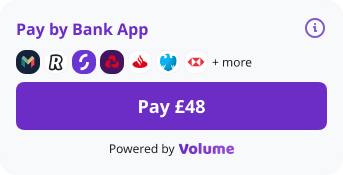
VolumeButton when user see it for the first time.
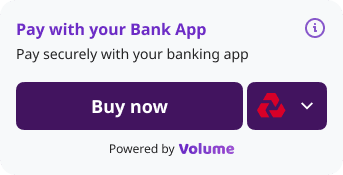
VolumeButton for the returning users. The bank that was used last time is preselected.
You can use VolumeButton widget by just declaring it in any Widget. To successfully initiate transaction you should set MerchantPaymentId, Reference and amount.
var merchantPaymentId = generateMerchantPaymentId();

  @override
  void initState() {
    super.initState();
    _volumeButtonEventListener = VolumeButtonEventListener((value) {
      setState(() {
        merchantPaymentId = value;
      });
    });
  }

VolumePaymentButtonWidget(
  merchantPaymentId: merchantPaymentId, // Generate new value each time navigateToPaymentConsent event is emitted
  reference: "Example Reference", // Generate new reference value each time navigateToPaymentConsent event is emitted
  amount: 50.0,
  isEnabled: true,
  currency: "GBP",
  country: "GB",
  volumeEventListener: volumeButtonEventListener,
  merchantProvidedPayerDetails: MerchantProvidedPayerDetails(
    email: "john.doe@example.com",
    name: "John Doe",
    phone: "+44 20 7946 0958",
    account: PayerAccount(
      holderName: "John Doe",
      accountNumber: "12345678",
      sortCode: "123456",
      iban: "DE89370400440532013000",
    ),
    address: PayerAddress(
      addressLine1: "123 Main Street",
      addressLine2: "Apt 4B",
      countryCode: "GB",
      town: "London",
      postCode: "SW1A 1AA",
    ),
    useForUxFlowOptimisation: true,
  ),
  metadata: <String, dynamic>{
      "type": "shirt",
      "color": "black",
      "owner": {
        "position": "CTO",
        "description": "Very handsome man",
        "details": {
          "name": "John",
          "surname": "Doe",
        },
        "relatedItems": [
          { "itemName": "trousers", "color": "blue" },
          { "itemName": "shoes", "color": "white" },
        ],
      },
    },
)

String generateMerchantPaymentId()  {
  return "This should be unique value"; //TODO Get merchant Payment Id value from backend
}

class VolumeButtonEventListener implements VolumeEventListener {
  final void Function(dynamic value) onNavigateToPaymentConsent;
  const VolumeButtonEventListener(this.onNavigateToPaymentConsent );

  @override
  onEvent(VolumeEvent event) {
    switch (event.runtimeType) {
      case NavigateToPaymentConsent:
        onNavigateToPaymentConsent(generateMerchantPaymentId());
        return;
    }
  }
}
Properties
Expand the section below for a quick glance at what you need to know.
VolumeProvider properties
Required Properties
| key | type | example | description |
|---|---|---|---|
| applicationId | String | 123456789 | Your Application Id as provided in your Merchant Portal. (Provided by Volume) |
| volumeEnvironment | String | sandbox | Environment to be used, this is either 'live' | 'sandbox' | A full URI if we have provided a specific environment for you. |
Optional Properties
| key | type | example | description |
|---|---|---|---|
| volumeEventListener | VolumeEventListener | Events | Event listener, object that reacts to Volume events, see Events for detailed instructions on how this works |
| showSandboxBanks | Boolean | true | Flag to enable showing sandbox banks. Used for testing |
| minPaymentAmount | BigDecimal | 0.01 (default: 0.01) | Minimum value for the amount field for each payment, when supplying a value smaller than this, a PAYMENT_AMOUNT_TOO_SMALL event will be emitted and the payment will not reach the volume api. |
| maxPaymentAmount | BigDecimal | 15000 (default: 15000) | Maximum value for the amount field for each payment, when supplying a value greater than this, a PAYMENT_AMOUNT_TOO_LARGE event will be emitted and the payment will not reach the volume api. |
| buttonCustomisation | ButtonCustomisation | Tweak the look and feel of the Volume button, properties to make changes to the colours, and border of the button. | |
| themeMode | VolumeThemeMode | light (default) | Colour theme of the Volume components: light, dark or system (follows the device setting). See Dark Mode. |
| translations | Map String to VolumeTranslations | Map of VolumeTranslations per language like "en" or "de". Allows to translate Volume component. | |
| language | String | en (ISO 639) | Sets the language to be used on Volume component. |
For more information on Events with onEvent. Check out Events.
Available countries
| Country | Country code | Currency |
|---|---|---|
| United Kingdom | GB | GBP |
| Hungary | HU | EUR |
| Czech Republic | CZ | EUR |
| Denmark | DK | EUR |
| Netherlands | NL | EUR |
| Germany | DE | EUR |
| Malta | MT | EUR |
| Liechtenstein | LI | EUR |
| Spain | ES | EUR |
| Finland | FI | EUR |
| Bulgaria | BG | EUR |
| Norway | NO | EUR |
| Iceland | IS | EUR |
| Ireland | IE | EUR |
| Portugal | PT | EUR |
| Romania | RO | EUR |
| Italy | IT | EUR |
| Latvia | LV | EUR |
| Greece | GR | EUR |
| Lithuania | LT | EUR |
| Belgium | BE | EUR |
| Austria | AT | EUR |
| France | FR | EUR |
| Estonia | EE | EUR |
| Sweden | SE | EUR |
VolumePaymentView has following setters
| key | type | constraints | example | description |
|---|---|---|---|---|
| amount | BigDecimal | Min 0.01, up to 2 decimal places | 1 | Amount to be paid, ie £1.00. |
| currency | String | ISO 4217 | GBP | Currency of payment |
| country | String | ISO 3166-1 alpha-2 | GB | Country of origin of the payment. |
| reference | String (Optional) | Max 18 chars, Alphanumeric | ABC-123 | Pass a bank transfer reference, it will be visible by both a client and merchant in bank transfer history. |
| merchantPaymentId | String (Optional) | Max 50 chars, unique per payment | 123456 | Pass a merchantPaymentId to associate a unique identifier for the payment, this will be returned to you in any webhook or api responses for the given payment |
| isEnabled | Boolean | true | Changes the Enabled/Disabled state of the Volume button | |
| metadata | Map String to Dynamic | Max 5000 chars length | Metadata is an optional JSON object which will be passed back in webhooks as paymentMetadata. It can only accepts primitives (as well as dictionaries and arrays of primitives). | |
| volumeEventListener | VolumeEventListener | Event listener, object that reacts to Volume events, see Events for detailed instructions on how this works | ||
| paymentIdentifiersProvider | PaymentIdentifiersProvider | Optional | Provider for PaymentIdentifiers like MerchantPaymentId and Reference that are generatedPaymentIdentifiers on Merchant backend | |
| merchantProvidedPayerDetails | MerchantProvidedPayerDetails | Optional | Provides improvements like faster UX (bank detection based on IBAN for EURO payments). Note that country param must match th country of provided IBAN! | |
| reasonForPayment | String | Optional, max 100 chars | Why the payer is paying. See Compliance Details. | |
| ultimateBeneficiary | UltimateBeneficiary | Optional | The party that finally receives the funds, when it is not you. See Compliance Details. |
Dark Mode
Set themeMode in VolumeSetup to VolumeThemeMode.light (default), dark or system (follows the device). To switch at runtime, call VolumeProvider.setThemeMode() after init.
VolumeProvider.init(VolumeSetup(applicationId: "", volumeEnvironment: "sandbox", themeMode: VolumeThemeMode.system), myApp);

VolumeProvider.setThemeMode(VolumeThemeMode.dark);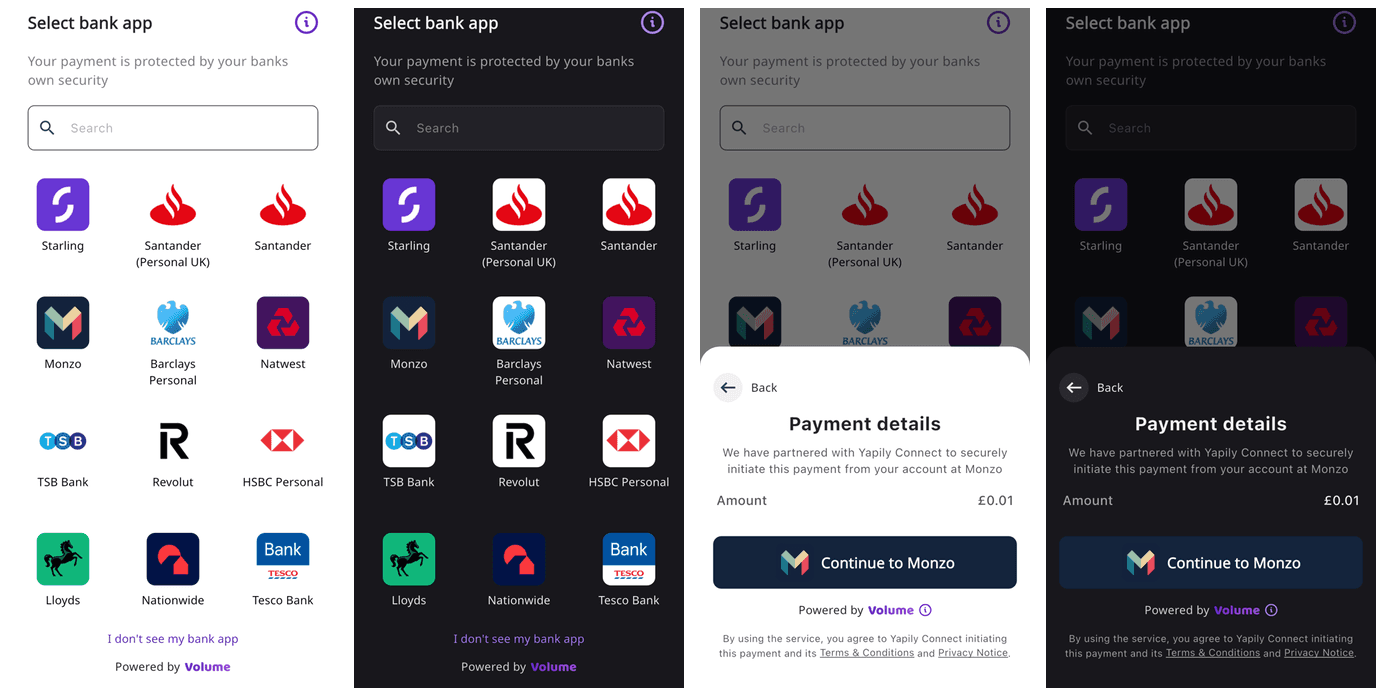
Regenerating Merchant Payment ID
Each time VolumeEvent.NavigateToPaymentConsent is emitted Merchant Payment ID should be set to a new unique value.
Rendering Volume Button without MerchantPaymentId (Optional)
The PaymentIdentifiersProvider is an optional feature that allows merchants to provide a MerchantPaymentId and Reference fields when the user clicks the Volume Pay button.
This enables the rendering of the Volume Button before creating a Payment entity on the merchant side.
providePaymentIdentifiers(PaymentIdentifiersRequest request): An asynchronous method that returns a Future<PaymentIdentifiers> object containing the payment identifiers.
The request parameter carries the payment values current at the time of the call — they can change while checkout is open (see Live Price Updates), so use these values rather than ones captured earlier:
request.amount— the payment amount formatted with two decimal places (e.g."12.32"), ornullwhen not yet set.request.currency— the ISO 4217 currency code (e.g."GBP"), ornullwhen not yet set.
class VolumePaymentIdentifiersProvider extends PaymentIdentifiersProvider {
  @override
  Future<PaymentIdentifiers> providePaymentIdentifiers(PaymentIdentifiersRequest request) async {
    try {
      // The current amount and currency (e.g. "12.32", "GBP") are available here in case
      // they need to be sent to the backend, e.g. to reconcile them with the values used
      // when creating the merchant payment id.
      var merchantPaymentIdFromBackend = "123"; // Get merchant Payment Id from backend
      var referenceFromBackend = "ref123"; // Get reference from backend
      var generatedPaymentIdentifiers = PaymentIdentifiers(merchantPaymentId: merchantPaymentIdFromBackend, reference: referenceFromBackend);
      return generatedPaymentIdentifiers;
    } catch (e) {
      // Return result with error message in case of exception
      // If errorMessage is not null then it will be displayed to the user as an error message
      return PaymentIdentifiers(merchantPaymentId: "", reference: "", errorMessage: e.toString());
    }
  }
}

// Usage in the VolumePaymentButtonWidget
VolumePaymentButtonWidget(
  merchantPaymentId: merchantPaymentId,
  reference: reference,
  amount: amount,
  currency: currency,
  country: country,
  isEnabled: isEnabled,
  volumeEventListener: _volumeButtonEventListener,
  paymentIdentifiersProvider: VolumePaymentIdentifiersProvider(),
  metadata: const <String, dynamic>{
    // ... metadata
  },
)IMPORTANT: When paymentIdentifiersProvider is provided then merchantPaymentId and reference fields values will be ignored and paymentIdentifiersProvider will be called each time user clicks on the Volume Button.
Controlling the Final Tap (Cancel or Change the Amount)
providePaymentIdentifiers(request) runs on the final tap - after the payer picks a bank, before anything is created on Volume. The SDK awaits your Future and shows a loading state, so you can call your backend, re-quote a price, or show your own dialog on top of the payment sheet. What you return decides how the flow continues:
| Return value | What happens |
|---|---|
PaymentIdentifiers(merchantPaymentId: ..., reference: ...) | The payment is created and the payer continues to the bank. |
PaymentIdentifiers(..., amount: 12.34) | Same, but the payment is created with your amount instead of the one on the session. Last resort - see Changing the amount mid-flow. |
PaymentIdentifiers.error("...") | An error alert is shown, the payer stays on the confirmation screen, and a retry re-invokes the provider. No payment is created. Use this for transient failures worth retrying - a network error or a timeout while reaching your backend. |
PaymentIdentifiers.cancelled("REASON") | The payment sheet closes, no payment is created, and your listener gets PaymentCancelledByMerchant with the reason. |
Cancelling the flow
Use PaymentIdentifiers.cancelled(reason) when the payer should not continue - for example an expired rate or a failed last-moment check. The reason string is delivered verbatim to your VolumeEventListener, so you can route on it:
class RateCheckingProvider extends PaymentIdentifiersProvider {
  @override
  Future<PaymentIdentifiers> providePaymentIdentifiers(PaymentIdentifiersRequest request) async {
    final ok = await myBackend.validateRate(request.amount, request.currency);
    if (!ok) {
      return PaymentIdentifiers.cancelled("RATE_EXPIRED");
    }
    final ids = await myBackend.createPaymentIdentifiers();
    return PaymentIdentifiers(merchantPaymentId: ids.merchantPaymentId, reference: ids.reference);
  }
}

class MyEventListener implements VolumeEventListener {
  @override
  void onEvent(VolumeEvent event) {
    switch (event) {
      case PaymentCancelledByMerchant _:
        if (event.reason == "RATE_EXPIRED") {
          // The sheet is already closed - refresh your prices and update the button's amount.
        }
        return;
      // ... other events
    }
  }
}
Notes:
- Cancellation takes precedence over everything else in the same object -
merchantPaymentIdandreferenceare ignored. - An empty reason still cancels, it just arrives without a reason.
- Add
errorMessage(PaymentIdentifiers.cancelled("RATE_EXPIRED", errorMessage: "...")) to show the payer an alert over your screen after the sheet closes.
Changing the amount mid-flow
PaymentIdentifiers(..., amount: 12.34) creates the payment with your amount instead of the one on the session: the confirmation screen adopts the new price and continues straight to the bank with it, without calling the provider again.
Use it as a last resort, only when a late re-quote is unavoidable - for example an FX rate that can only be fixed at the moment of payment. Otherwise keep the displayed price current with Live Price Updates: the payer then taps pay on a price they have already seen, and nothing has to change at the final tap.
If you do change the amount, showing the new price to the payer is your responsibility. Show your own dialog inside the providePaymentIdentifiers future - the payment sheet waits underneath in its loading state - and return the new amount only if the payer accepts it. If they decline, return PaymentIdentifiers.cancelled(...).
Notes:
amountis adoublein major units (e.g.12.34), the same as the widget'samount, with at most 2 decimal places.- A returned
amountgoes through the standard amount validations. A rejected amount fails the attempt: the payer gets an error alert and stays on the confirmation screen at the previous price, your listener getsPaymentAmountTooSmall/PaymentAmountTooLarge/GenericError, and no payment is created.
Live Price Updates (Price Streaming / Price Polling)
If your prices change while the user is on the checkout screen (for example FX-based or time-limited prices), pass every new price to the amount parameter of VolumePaymentButtonWidget and rebuild the widget - typically by updating your state in setState. The SDK picks the change up automatically:
- The amount displayed on the payment confirmation screen refreshes while the screen is open, and the refreshed amount is the one used when the payment is created.
- When a
paymentIdentifiersProvideris configured, the current amount and currency are passed toprovidePaymentIdentifiers(request)asrequest.amount/request.currency.
Both approaches below feed new prices through the same helper — the widget code stays identical, only the price source differs:
double amount = 0.01;

void _applyPrice(double price) {
  setState(() {
    amount = price; // rebuilds VolumePaymentButtonWidget with the new amount
  });
}

// In build():
VolumePaymentButtonWidget(
  amount: amount,
  // ... other parameters
)
Price streaming with a push-based stream
Use this approach when your backend can push prices to the app (WebSocket, SSE, Firebase, etc.). Subscribe to the stream and apply every emitted price:
StreamSubscription<double>? _priceSubscription;

@override
void initState() {
  super.initState();
  // priceStream is your backend's price feed, e.g. a WebSocket stream
  _priceSubscription = priceStream.listen(_applyPrice);
}

@override
void dispose() {
  _priceSubscription?.cancel();
  super.dispose();
}
Price streaming with polling
Use this approach when your backend only exposes a REST endpoint for the current price. Re-fetch it periodically and apply the result:
Timer? _priceTimer;

@override
void initState() {
  super.initState();
  _priceTimer = Timer.periodic(const Duration(seconds: 10), (_) async {
    final price = await fetchPriceFromBackend(); // e.g. GET /current-price
    if (_priceTimer != null) _applyPrice(price); // ignore responses arriving after dispose
  });
}

@override
void dispose() {
  _priceTimer?.cancel();
  _priceTimer = null;
  super.dispose();
}
What gets charged
- The price locks in when the user taps pay: the displayed amount freezes while the payment is being processed (spinner visible), and that frozen amount is the one the payment is created with. If processing fails and the user returns to the confirmation screen, live updates resume with the latest price. Price updates arriving after the payment is created do not change it - if your price expires mid-flow, handle that on your backend (e.g. reject or refund via your reconciliation).
- To reconcile server-side, use
providePaymentIdentifiers(request):request.amountis read at the moment the user taps pay, so your backend can bind the merchant payment id to the exact price being charged and verify it against the amount reported in the payment webhook. - Streamed prices must stay within
minPaymentAmount/maxPaymentAmountconfigured onVolumeSetup- a price outside the bounds emitsPAYMENT_AMOUNT_TOO_SMALL/PAYMENT_AMOUNT_TOO_LARGEand the payment is not created.
Merchant Provided Payer Details
The merchantProvidedPayerDetails parameter allows merchants to pre-populate payer information to optimize the user experience during payment flow. This is also required to gain access to Volume's Confirmation of Payer feature, and to enable the search and filtering of payments by these details.
Key Benefits
- Faster UX: Automatic bank detection based on provided IBAN for EURO payments
- Improved Conversion: Pre-filled forms reduce user friction
- Confirmation of Payer: Verify the identity of account holders against your KYC data
Usage
VolumePaymentButtonWidget(
  // ... other parameters
  merchantProvidedPayerDetails: MerchantProvidedPayerDetails(
    email: "john.doe@example.com",
    name: "John Doe",
    phone: "+44 20 7946 0958",
    account: PayerAccount(
      holderName: "John Doe",
      accountNumber: "12345678",
      sortCode: "123456",
      iban: "DE89370400440532013000",
    ),
    address: PayerAddress(
      addressLine1: "123 Main Street",
      addressLine2: "Apt 4B",
      countryCode: "GB",
      town: "London",
      postCode: "SW1A 1AA",
    ),
    useForUxFlowOptimisation: true,
  ),
)
Properties
| Property | Type | Required | Description |
|---|---|---|---|
email | String | No | Customer's email address |
name | String | No | Customer's full name |
phone | String | No | Customer's phone number ideally in +XX 123456 format |
account | PayerAccount | No | Customer's bank account details |
address | PayerAddress | No | Customer's address details |
useForUxFlowOptimisation | Boolean | No | Enable UX optimizations like bank detection |
dateOfBirth | String | No | Customer's date of birth, yyyy-MM-dd (e.g. 1990-01-31). Must be in the past and not before 1900-01-01 |
nationality | String | No | Customer's nationality, ISO 3166-1 alpha-2 country code (e.g. GB) |
residentialAddress | String | No | Customer's residential address as free text, max 500 chars. An alternative to address |
PayerAccount Properties
| Property | Type | Required | Description |
|---|---|---|---|
holderName | String | No | Account holder's name as it appears on the bank account |
accountNumber | String | No | Bank account number (use with sortCode) |
sortCode | String | No | Bank sort code without dashes (use with accountNumber) |
iban | String | No | International Bank Account Number |
PayerAddress Properties
| Property | Type | Required | Description |
|---|---|---|---|
addressLine1 | String | No | First line of the address |
addressLine2 | String | No | Second line of the address |
countryCode | String | No | ISO 3166-1 alpha-2 country code |
town | String | No | City or town |
postCode | String | No | Postal code or ZIP code |
Account Identification Rules
Important: You must use either IBAN (EUR) or the combination of account number and sort code (GBP), but not both:
- IBAN Method: When
ibanis provided,accountNumberandsortCodeshould benull - Account Number Method: When
accountNumberandsortCodeare provided,ibanshould benull
Example with IBAN:
PayerAccount(
  holderName: "John D.",
  iban: "DE89370400440532013000",
  accountNumber: null,
  sortCode: null,
)
Example with Account Number and Sort Code:
PayerAccount(
  holderName: "John D.",
  accountNumber: "12345678",
  sortCode: "123456",
  iban: null,
)
Important Notes
When using merchantProvidedPayerDetails with IBAN, ensure the country parameter matches the country of the provided IBAN.
Note that there are banks like Revolut or Wise that are available in many countries.
- Bank detection works automatically for EURO payments when a valid IBAN is provided
- The
useForUxFlowOptimisationflag is set totrueto enable all UX improvements - All fields are optional, allowing partial pre-population based on available data
Compliance Details
Pay-ins can carry compliance details about the payer, the payment and the final recipient. The SDK has no UI for them: you pass the values you already hold, and the SDK sends them with the payment.
VolumePaymentButtonWidget(
  // ... other parameters
  merchantProvidedPayerDetails: MerchantProvidedPayerDetails(
    email: "john.doe@example.com",
    name: "John Doe",
    dateOfBirth: "1990-01-31",
    nationality: "GB",
    residentialAddress: "10 Downing Street, London, SW1A 2AA",
  ),
  reasonForPayment: "Invoice 1042",
  ultimateBeneficiary: UltimateBeneficiary(
    fullName: "Jane Roe",
    currency: "GBP",
    country: "GB",
  ),
)
UltimateBeneficiary Properties
| Property | Type | Required | Description |
|---|---|---|---|
fullName | String | No | Full name of the final recipient, max 255 chars |
currency | String | No | Currency the final recipient is paid in, three uppercase letters (e.g. GBP) |
country | String | No | Country of the final recipient, ISO 3166-1 alpha-2 country code (e.g. GB) |
Required Details
By default every compliance detail is optional. Volume can make a set of them required for your application. When it is required, a payment without every one of these is rejected and no payment is created:
merchantProvidedPayerDetails.namemerchantProvidedPayerDetails.emailmerchantProvidedPayerDetails.dateOfBirth- an address: either
merchantProvidedPayerDetails.residentialAddress, or a completemerchantProvidedPayerDetails.address(addressLine1,town,postCode,countryCode) reasonForPayment
nationality, phone and ultimateBeneficiary are never required.
Values in the wrong format are rejected whether or not the details are required for your application: a malformed email, a name over 255 chars, an invalid dateOfBirth or nationality, a reasonForPayment over 100 chars.
Handling a Rejected Payment
When a payment is rejected, the SDK shows the payer an error dialog, and your VolumeEventListener receives a PaymentError event. Its message holds the reason from Volume, for example Missing required fields: merchantProvidedPayerDetails.dateOfBirth, reasonForPayment, so you can log it and fix the data you send.
Implementing the after payment screen (Callback) in mobile app
IMPORTANT: Handling properly Callback links is critical for the smooth User journey ending in Merchant app on payment status page.
Follow instructions for the Volume Callback handling: Callback
iOS Banks detection required setup
To make bank detection work Apple require we add some values in your Info.plist to indicate intent to work with app schemes, we use this to detect which banking apps the end user has installed on their phone so that we can show them only banks they have installed.
To complete the setup there are some <string> tags we need to add under the LSApplicationQueriesSchemes key in Info.plist file.
<key>LSApplicationQueriesSchemes</key>
	<array>
		<string>BMBGB</string>
		<string>revolut</string>
		<string>natwestbank</string>
		<string>monzo</string>
		<string>santanderretail</string>
		<string>rbs</string>
		<string>lloyds-retail</string>
		<string>ukcomhsbcmobilebanking</string>
		<string>zappcfi437759</string>
		<string>hsbc-pwnwguti5z</string>
		<string>zapp</string>
		<string>launchAIB</string>
		<string>ie.aib.mobilebanking</string>
		<string>BOIOneAPP</string>
		<string>halifax-retail</string>
		<string>starlingbank</string>
		<string>tescobank</string>
		<string>tsbmobile</string>
		<string>sparda-app</string>
		<string>bankingappspardaproduktion</string>
		<string>secureappspardaproduktion</string>
		<string>sapp-pushtan</string>
		<string>sapp-invest</string>
		<string>de.sparda.securego</string>
		<string>bos-retail</string>
		<string>launchbca</string>
		<string>comfirstdirectbankingonthego</string>
		<string>cs-com.virginmoney.uk.mobile.ios</string>
		<string>transferwise</string>
		<string>ybssavings</string>
		<string>chase-international</string>
	</array>
Testing
After you have completed the steps above, then you can start testing.
We strongly recommend to use sandbox environment before switching to live environment.
Please note that sandbox testing will not open the Banking app due to lack of testing environment offered by the different banks in the UK. However, a successful test will open the bank environment via the browser. The user experience will differ bank by bank. Ask us more information at support@getvolume.com or use the chat in this page to get immediate assistance.
Please check Sandbox Banks Credentials to be able to test with Natwest Sandbox and other sandbox banks.